No Download Required
The entire PowerUp platform runs through your mobile browser. There is no native app to install, no storage space consumed and no waiting for updates from an app store.
Everything About the App at PowerUp Casino
The full PowerUp Casino experience runs in your mobile browser without any download. Access 6,000+ games, live tables, your Career Mode VIP status and all payment methods directly from iOS or Android.
The full PowerUp Casino experience runs in your mobile browser without any download. Access 6,000+ games, live tables, your Career Mode VIP status and all payment methods directly from iOS or Android.
The full PowerUp Casino experience runs in your mobile browser without any download. Access 6,000+ games, live tables, your Career Mode VIP status and all payment methods directly from iOS or Android.
Play on Mobile Play responsibly. You must be 18 or older to register. Full bonus terms and conditions apply.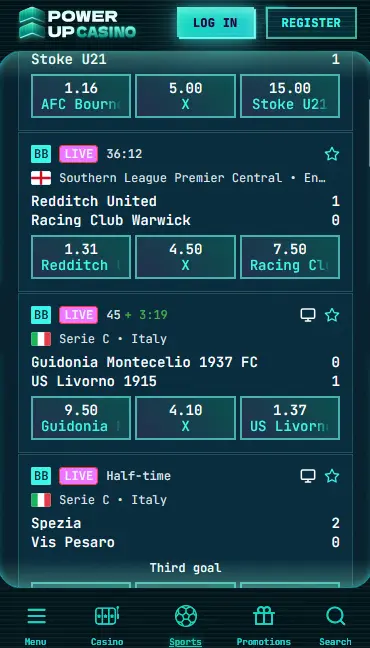
What Makes Mobile PowerUp Stand Out
No Download Required
The entire PowerUp platform runs through your mobile browser. There is no native app to install, no storage space consumed and no waiting for updates from an app store.
Full Game Catalogue
All 6,000+ titles including pokies from Pragmatic Play and Play'n GO, live dealer tables from Evolution Gaming, jackpot games and the integrated sportsbook are accessible on mobile.
Secure Mobile Sessions
256-bit SSL encryption applies to every mobile session. Your login credentials, payment details and personal data are protected the same way as on desktop.
Mobile Security Best Practices
What You Should Do
What You Should Avoid
Mobile PowerUp: The Key Points
Pros
Cons
Device Requirements
Android
iOS
How to Get Started on Mobile
The PowerUp mobile platform delivers the complete casino experience through the browser, without any of the limitations that come with an absent native app.
Every section of the PowerUp desktop site translates to the mobile browser, including the full game lobby organised by category, the live casino suite from Evolution Gaming and Pragmatic Play Live, the integrated sportsbook, account management, the Career Mode VIP dashboard, and the complete payment cashier. The mobile interface is responsive and adapts to both portrait and landscape orientations, with touch-optimised controls on game reels, live table betting interfaces and the sportsbook bet slip.
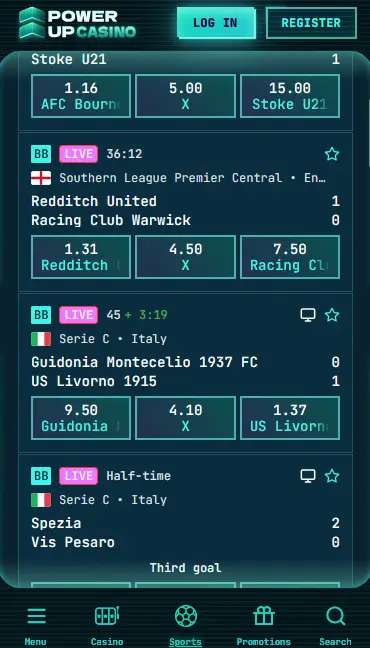
The mobile browser version and the desktop version share an identical feature set. There are no games, promotions or payment methods exclusive to one platform or the other. The visual layout adapts to screen size, with the navigation menu collapsing to a hamburger icon on smaller screens. Game loading speeds on mobile depend on the quality of the internet connection; a stable Wi-Fi connection or a 4G/5G mobile data connection delivers the smoothest experience for live dealer tables from Evolution Gaming or Ezugi, which stream real-time video.
PowerUp Casino does not offer a downloadable file or a listing in any app store. The mobile experience is delivered through the browser, which means the steps below are about accessing and optimising the site on your device rather than installing software.
Open Chrome on your Android device and navigate to powerup24.com. The site loads in its mobile-optimised layout automatically. To create a shortcut, tap the three-dot menu in the top-right corner of Chrome and select Add to Home Screen. Give the shortcut a name and tap Add. The icon appears on your home screen and opens the PowerUp site directly when tapped, functioning like a native app without using storage.
Open Safari on your iPhone or iPad and go to powerup24.com. Once the site loads, tap the Share button (the box with an upward arrow) at the bottom of the screen. Scroll through the share sheet and tap Add to Home Screen. Confirm the name and tap Add in the top-right corner. The shortcut appears on your home screen and launches the PowerUp mobile site with one tap.
The home screen shortcut created through the steps above functions as a Progressive Web App (PWA) shortcut. It does not install any application code to your device. Instead, it opens the browser and navigates directly to powerup24.com in a streamlined view. This means all site updates are automatic, there are no storage requirements beyond the browser cache, and no app store approval or regional restriction applies.
PowerUp’s mobile platform runs on iOS and Android across a wide range of devices.
Android 8.0 (Oreo) or later ensures full compatibility with all site features, including live streaming from Evolution Gaming tables. Chrome 90 or above is the recommended browser. Devices running earlier Android versions may experience rendering issues or limitations with video-based live casino content.
iOS 14.0 or later on iPhone or iPad covers the full feature set. Safari 14 or later is recommended. Face ID and Touch ID can be used for device unlock, and if Safari has saved your PowerUp login, biometric authentication via the browser’s autofill function may be available depending on your device settings.
| Specification | Android | iOS |
|---|---|---|
| OS Version | Android 8.0+ | iOS 14.0+ |
| Browser | Chrome 90+ | Safari 14+ |
| Connection | 4G / Wi-Fi | 4G / Wi-Fi |
| Storage (app) | None required | None required |
| Camera/Mic | Not required | Not required |
Mobile play at PowerUp carries the same security standards as the desktop version.
All data transmitted between your device and the PowerUp servers is protected by 256-bit SSL encryption. This applies to your login credentials, payment details submitted through the cashier, and personal information entered during registration or KYC verification.
Two-factor authentication can be enabled through the account security settings. Once active, a one-time verification code is required in addition to your password when signing in from a new device or browser. This substantially reduces the risk of unauthorised account access if your password is ever exposed.
On iOS, Safari’s autofill system can offer Face ID or Touch ID to fill saved passwords on the PowerUp login page. On Android, Chrome supports fingerprint autofill through the device’s biometric settings. Enabling these options reduces login friction on mobile without sacrificing security, provided the device itself is secured with a PIN or biometric lock.
The full PowerUp game catalogue is available through the mobile browser, with no titles restricted to desktop only.
All 4,000+ pokies load in the mobile browser, including Gates of Olympus and Bigger Bass Bonanza from Pragmatic Play, Book of Dead and Rise of Olympus 100 from Play’n GO, Starburst and Gonzo’s Quest Megaways from NetEnt, and the exclusive pokie Night of the Scarabs from Spinomenal. High-volatility bonus-buy slots from Hacksaw Gaming and Nolimit City are also fully playable in portrait or landscape mode.
Evolution Gaming, Pragmatic Play Live and Ezugi live tables stream smoothly on mobile over a 4G or Wi-Fi connection. Gold Saloon Roulette, Lightning Roulette, Crazy Time, Gold Saloon Blackjack and Emperor Baccarat all function identically to their desktop versions, with the betting interface adjusted for touch input.
Digital blackjack, roulette, baccarat and poker variants are available in the table games section. The touch interface handles card dealing animations and bet placement without lag on supported devices.
Progressive jackpot pokies including Divine Fortune from NetEnt, Mega Moolah from Microgaming and Gunslinger Reloaded from Play’n GO are accessible on mobile. Live jackpot amounts displayed on the game icons in the lobby update in real time on mobile as they do on desktop.
Registration can be completed entirely from the mobile browser. Tap Register on the PowerUp homepage, fill in your name, date of birth, email address and chosen password, then confirm your email via the link sent to your inbox. Identity verification (KYC) requires an Australian driver’s licence or passport for photo ID and a utility bill or bank statement as proof of address; these documents can be photographed and uploaded directly from your phone’s camera.
Enter your registered email address and password on the mobile login page and tap Sign In. If 2FA is enabled, enter the verification code when prompted. For full step-by-step sign-in guidance and troubleshooting, visit the login page.
All payment methods available on desktop are also available through the mobile cashier, including Neosurf, Visa, Mastercard, MiFinity, MuchBetter, Flexepin, Paysafecard, Payz, Jeton and cryptocurrency including Bitcoin, Ethereum, Litecoin and Tether (USDT).
| Method | Deposit Speed | Withdrawal Time |
|---|---|---|
| Visa / Mastercard | Instant | 1-3 business days |
| Neosurf | Instant | Deposit only |
| MiFinity / MuchBetter | Instant | 1-3 business days |
| Bitcoin / Ethereum | Instant | 1-3 business days |
| Tether (USDT) | Instant | 1-3 business days |
| Litecoin | Instant | 1-3 business days |
The mobile cashier applies the same 256-bit SSL encryption as the desktop version. Cryptocurrency transactions benefit from blockchain confirmation, adding an additional layer of transaction immutability. No platform fees are applied to deposits or withdrawals on mobile.
The four-deposit welcome package worth up to $1,600 plus 300 free spins can be claimed entirely through the mobile browser. Deposit a minimum of $40 per stage using an eligible method, activate the bonus in the My Bonus section of your profile, and play eligible pokies from Pragmatic Play, Play’n GO and NetEnt to meet the 35x wagering requirement within 10 days. Full bonus terms and all conditions are on the bonus page. 18+ only. T&Cs apply.
Live chat is accessible from the mobile browser by tapping the chat icon at the bottom of the screen. Email support is available at [email protected]. Both channels operate 24 hours a day, seven days a week, covering Australian Eastern Standard Time (AEST) and Australian Eastern Daylight Time (AEDT) without restriction.
Deposit limits, session time limits, cooling-off periods and self-exclusion are all manageable from within your account settings on mobile. If you need to take a break or set boundaries on your play, these tools are available at any time through the account management section of the mobile browser site.
Mobile App Questions
No. PowerUp Casino does not currently offer a native app on the Apple App Store or Google Play Store. All mobile play is through the mobile-optimised browser site at powerup24.com.
Android 8.0 (Oreo) or later is recommended for stable performance. Chrome 90 or a later browser version ensures all game features, including Evolution Gaming live tables and Pragmatic Play pokies, load correctly.
Yes, the full payment cashier including Neosurf, Visa, Mastercard and cryptocurrency deposits is available on mobile, and the four-deposit welcome package up to $1,600 + 300 free spins can be activated entirely from a mobile browser. 18+ only.
Yes. Because PowerUp runs through a browser rather than a downloaded app, any updates to the site go live automatically the next time you load the page. There is nothing to install or approve on your device.
Start Playing on Mobile Today
Grab 120% up to $1,600 and 300 free spins.
Play Now Play responsibly. You must be 18 or older to register. Full bonus terms and conditions apply.